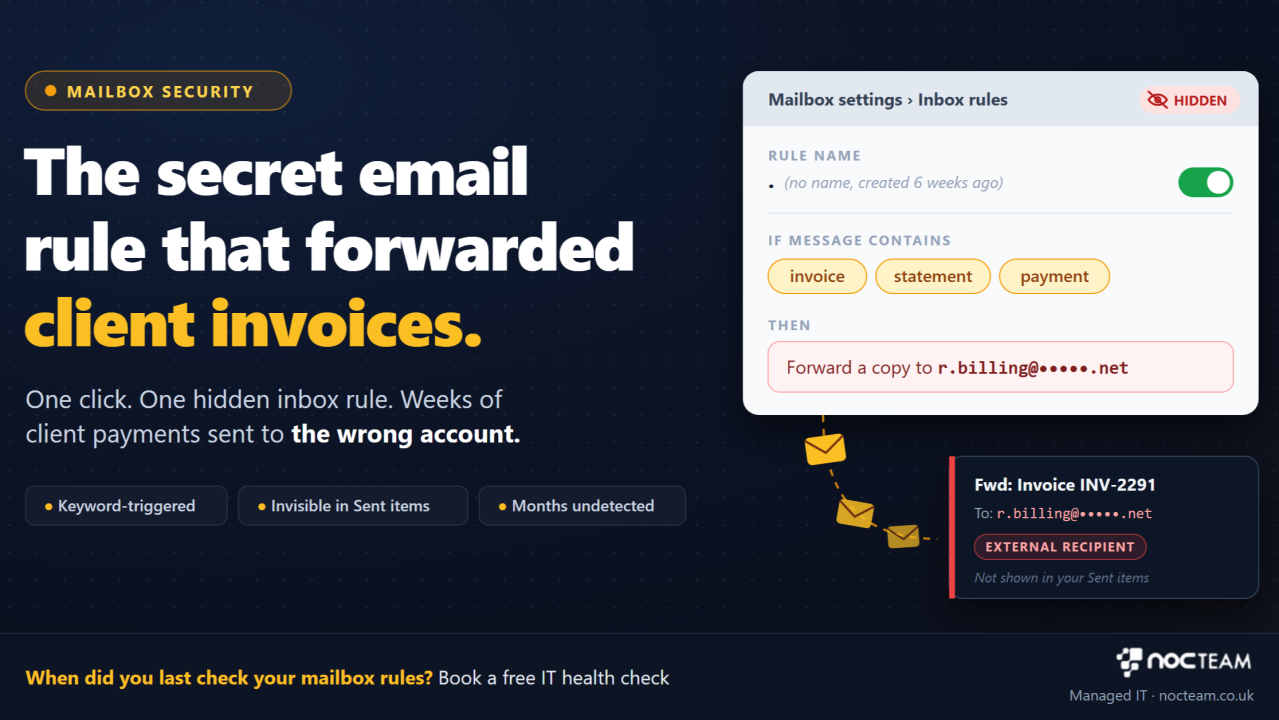
Sarah, the managing director of a commercial law firm in Leeds, sits at her desk on a quiet Thursday morning reviewing month-end accounts. Her head of billing walks into the office with a puzzling query from a long-standing corporate client. The client claims they paid three major invoice installments weeks ago, but the firm's bank account shows no record of the funds. When Sarah searches her email inbox for the payment confirmations, she finds nothing. What she does not realise is that weeks earlier, after clicking a link in a deceptive email, a hidden forwarding rule was silently created inside her mailbox settings. Every incoming email containing words like invoice, statement, or payment was being automatically copied and sent to an external address controlled by an outsider, who then sent modified bank details directly to her client.
This troubling situation shows how hidden inbox rules operate and why they quietly undermine small firms. Modern email systems allow users to create automated rules that redirect or sort incoming messages based on specific keywords. While this feature helps busy professionals manage crowded inboxes, it also creates a discreet backdoor when an account is accessed by an outsider. Instead of locking you out or causing an obvious disruption, an intruder creates a quiet rule that works behind the scenes. Every relevant message is forwarded automatically, allowing someone else to monitor sensitive commercial conversations, intercept payment requests, and alter bank details without leaving any visible trace in your sent folder.
For a busy law practice, accountancy firm, or consultancy, the practical commercial damage of a hidden forwarding rule extends far beyond a delayed payment. When an outsider intercepts invoice correspondence, your firm loses direct control over its client billing. Corporate clients pay genuine money into fraudulent accounts, project schedules stall while financial discrepancies are investigated, and partners spend valuable hours handling awkward conversations with clients who feel their trust was misplaced. Explaining to a long-standing client that their financial transfers were redirected because a silent setting in your mailbox went unmonitored damages your professional standing and undermines the commercial relationships you rely upon to grow your business.
The root cause of this problem is rarely carelessness on the part of your staff. In many growing practices, email setups are treated as simple utility tools rather than core infrastructure that requires regular inspection. Management assumes that because an employee can log in and send messages normally, the account is completely secure. Because nobody routinely checks the background settings of staff mailboxes, hidden forwarding rules remain active for months, quietly leaking confidential billing data to outsiders while daily work continues as normal.
Fixing this gap requires moving beyond simple password management and establishing active control over your email environment. In plain terms, managing mailbox settings means regularly auditing background rules to ensure no external addresses are secretly receiving company messages. Controlling user access means applying automatic checks that flag whenever a new forwarding rule is created, allowing you to verify that the change was intentional before sensitive information leaves the firm.
Maintaining this level of protection depends on constant background oversight. It is important to remember that monitoring an email environment is separate from taking immediate technical action. Automated systems track mailbox health and watch for unusual forwarding rules day and night. Technical support engineers review alerts, investigate unexpected mailbox changes, and remove unauthorized rules during agreed working hours, or around the clock where a firm contracts for extended coverage. This structured approach catches hidden rules early and closes backdoors before your firm's payments are compromised.
This practical oversight is how NOCTeam helps growing practices keep their email systems secure, taking technical checks off your plate so leadership can focus on serving clients with complete confidence.
Book your free IT health check by visiting nocteam.co.uk or by emailing us at [email protected].
#BusinessContinuity #ITSupport #ManagedIT #ProfessionalServices #VirtualITManager
Originally published on LinkedIn.